

Based on my interactions with shoppers on Zazzle, I suspect that most people who buy a necktie from my stores are buying it as a gift.
What many don’t always realize is that the same pattern on that tie can go on dozens of other products — using the same Zazzle designer, in the same session, without starting from scratch. A duffel bag. A bandana. A tote. A set of stationery. Whatever makes sense for the person you’re shopping for.
That’s what the pattern transfer feature in Zazzle’s online designer makes possible, and it works for any necktie pattern in the store — flag neckties, profession ties, hobby ties, geometric patterns, all of them.
One Design, Dozens of Gifts, or Gift Sets
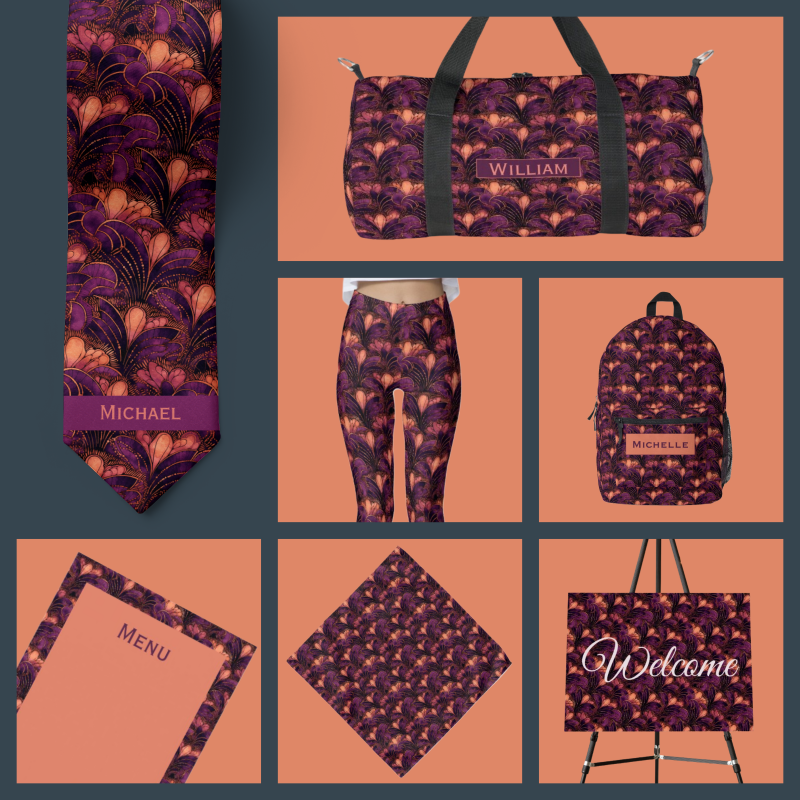
Great Custom Gift Ideas: A favorite necktie design can be transferred to dozens of items
The most obvious use case is a gift set. Instead of giving someone a tie and calling it done, you can build an entire coordinated collection around the same pattern:
- A tie and a matching bandana, for the man who wants a pocket square in the same pattern, a handkerchief, or a head wrap.
- A duffel bag or tote bag that carries the same design
- An apron for the grill master whose flag tie already lives in the closet
- A scarf, backpack, bookbag, or pillow for someone in the family who isn’t wearing a tie
For weddings, the possibilities expand considerably. If you’re coordinating groomsmen ties, you can extend that same pattern to gift bags, bandanas that double as pocket squares, scarves for bridesmaids, and stationery items like menus, signs, and invitations. One design, carried through the whole event.
And it doesn’t have to be a single recipient. A coordinated family look — a tie for him, leggings for her, a backpack for the kid — is entirely achievable from one pattern if you want to go that direction.
Step 1: Pick a Necktie Design that You Love
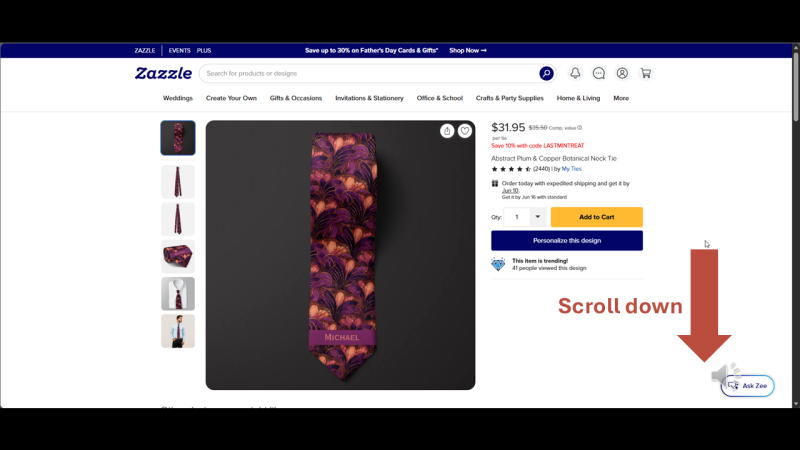
To start, scroll down to the 'Transfer to a Design Product' section on your favorite necktie product page.
The process starts on the Zazzle product page for the necktie. Scroll down until you see the “Transfer Design to a Product” section, click “View All Products,” search for whatever you want to transfer the pattern to, and open it in the designer. From there, the pattern comes with it — and you adjust it to fit the new product.
A few things are worth knowing before you start:
- Tie-specific elements — a monogram placeholder, a name band, anything that was part of the necktie design but doesn’t belong on the new product — need to be removed manually. Delete those first, then work with the pattern.
- Resize the pattern tile for the new product. A tile size that looks right on a four-inch-wide necktie will often look too small on a duffel bag. Bigger canvas, bigger tile.
- Keep the tile height and width equal. Occasionally the tile transfers with distorted dimensions — check and correct if needed.
- Copy the pattern to every side. Most multi-sided products (a duffel bag, for instance) will need the pattern pasted separately onto the back, left, and right panels. Check each one — the tile can behave slightly differently on each side.
None of it is complicated, but there are enough steps that a walkthrough helps the first time through.
Watch the Tutorial
The full step-by-step process is documented on the How to Transfer a Necktie Pattern to Other Gifts tutorial page, which includes the embedded video demonstration (also above) and written instructions you can follow along with while the Zazzle designer is open in another tab. A downloadable PDF cheat sheet is available there as well if you want a quick reference on your phone while you work.
The tutorial uses a duffel bag as the example product, but the process is the same regardless of what you’re transferring the pattern to. I chose the duffel bag to demonstrate the steps for enlarging the pattern tile and avoiding common pitfalls when transferring a design from a simple necktie to a larger multi-sided item.
Where to Start
Any necktie pattern in the store is transferable. If you’re starting with a flag necktie, the Flag Emporium collection has patterns for nearly 200 countries — five pattern variants each. If you’re starting with a wedding necktie or something from another collection, the same transfer process applies.
Once you’ve settled on a design, head to the How to Transfer a Necktie Pattern to Other Gifts tutorial and walk through it. Ten minutes the first time. Faster after that.